 ParseForge
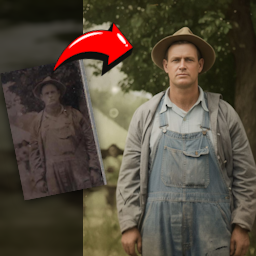
Vintage Photo Restorer
parseforge/vintage-photo-restorer
AIAutomation
Restores vintage and damaged photos from image URLs using AI. Fixes tears, scratches, fading, and stains, and optionally colorizes black and white images.
- Total users
- 22
- Monthly active
- 0
- Total runs
- 339
- Bookmarked
- 1
- Rating
- 5.0 (2)
- Last modified
- 2 days ago
This scraper was last updated on .
What does the Vintage Photo Restorer return?

Vintage Photo Restorer
Restore old, damaged, and faded photos with AI, directly from image URLs. Each restored image comes back with scratches removed, colors revived, and physical damage repaired. No photo editing skills required. Export to JPEG or PNG.
Old family photos, historical archives, and vintage prints degrade over time with tears, stains, fading, and noise. This Actor uses AI to restore those images automatically, fixing time degradation and physical damage in one run. You provide the image URLs and choose a restoration style, and it returns cleaned, enhanced, and optionally colorized versions.
| Who uses it | What they scrape Vintage Photo Restorer for |
|---|---|
| Family historians | Repair torn, faded, or stained family photos for digital archives and prints. |
| Archivists and librarians | Restore historical photographs in collections with age-related yellowing and physical wear. |
| Genealogy researchers | Clean up old portraits and documents to share clearer images with relatives. |
| Antique dealers | Enhance product photos of vintage items by removing scratches and improving contrast. |
What it does
This Actor restores vintage photos from direct image URLs and returns each restored image as a downloadable file.
- 🖼️ Restoration styles: auto, full-recovery, time-degradation, physical-damage, color-restoration, contrast-enhancement, scratch-removal, stain-removal, fade-correction, and noise-reduction.
- 🎨 Recolor styles: auto, natural, vibrant, vintage, warm, cool, cinematic, pastel, sepia, and black-white.
- 📝 Custom instructions: guide the AI with text prompts like 'keep the vintage sepia tone' or 'fix the torn corner on the left side'.
- ✨ AI artifact removal: an optional second pass that cleans up distortions and unnatural elements for a more natural result.
Results export to CSV, JSON, Excel, or XML, or straight from the API.
What you can do with Vintage Photo Restorer data
👨👩👧👦 Restore family photo albums.
A family historian uploads a set of scanned prints with tears and yellowing, selects full-recovery, and downloads cleaned images ready for a digital archive or reprint.
🏛️ Process a historical archive.
A librarian feeds URLs of early 20th-century photographs, uses time-degradation mode to correct fading and stains, and exports the restored files for an online exhibit.
🧬 Enhance genealogy records.
A genealogy researcher restores faded portrait photos with color-restoration and a custom prompt to keep the original sepia tone, then shares the clearer images with family members.
🛋️ Improve antique listings.
An antique dealer runs scratch-removal and contrast-enhancement on product photos to present items more clearly in online marketplaces.
Why choose this scraper
| What you get | |
|---|---|
| No login or API key | Restore photos without registering for a third-party service or managing API credentials. |
| Batch processing | Submit multiple image URLs in one run and receive all restored versions back. |
| Style control | Choose exactly how the AI repairs damage and applies color, from full recovery to targeted scratch removal. |
| Custom prompts | Add natural language instructions to guide the restoration toward a specific look or fix a particular flaw. |
How it compares
This Actor restores vintage photos with AI, while the Classic.com Cars Scraper extracts structured listing data for vintage automobiles. They serve different purposes and are not direct competitors.
| Feature | ParseForge | Classic.com Cars Scraper |
|---|---|---|
| Restores damaged vintage photos | Yes | Not listed |
| Colorizes black and white images | Yes | Not listed |
| Removes scratches and stains | Yes | Not listed |
| Scrapes vintage car listings | Not listed | Yes |
Configure the run
Drive the Actor with direct image URLs and select a restoration style, recolor style, and optional custom prompt. Each image is processed individually and returned as a restored file. The Input tab lists every parameter.
A first run with the defaults:
{
  "imageUrls": [
    "https://api.apify.com/v2/key-value-stores/S8l2sknfAAra9YPZ7/records/4awlzry3n4zf1.jpeg"
  ],
  "restorationStyle": "full-recovery",
  "recolorStyle": "auto",
  "removeAiArtifacts": false
}
Free users
Free-plan runs return up to 10 results as a preview. Upgrade your Apify plan to collect up to 1,000,000 results per run.
Run it
- Create a free Apify account with $5 in credit.
- Open the Vintage Photo Restorer.
- Set your inputs and any filters, then click Start.
- Export the results as CSV, Excel, JSON, or XML from the Dataset tab.
Run it programmatically through the Apify API (run-sync-get-dataset-items) or the ApifyClient for JavaScript and Python.
Use with AI agents (MCP)
Give an AI agent live access to Vintage Photo Restorer through the Model Context Protocol. Add the Actor to Claude, Cursor, or any MCP client:
claude mcp add --transport http apify "https://mcp.apify.com?tools=parseforge/vintage-photo-restorer"
Then prompt it in plain language to run the scraper and read back the results.
Troubleshooting
The restored photo still has some scratches or stains.
Try switching from a general mode like 'auto' to a targeted mode such as 'scratch-removal' or 'stain-removal'. You can also add a custom prompt describing the specific flaw to guide the AI more precisely.
The colors in the restored photo look unnatural or over-saturated.
Change the recolor style to 'natural' or 'vintage' for more subdued tones. If the issue persists, enable the 'remove AI artifacts' option to clean up distortions in a second pass.
The Actor run fails with an error about the image URL.
Make sure each image URL is a direct link to a publicly accessible image file, not a webpage. The URL should end with an image extension like .jpg or .png and be reachable without authentication.
Processing takes a long time for my photos.
High-resolution images and the 'full-recovery' or 'remove AI artifacts' options add processing time. For faster results, use a targeted style like 'scratch-removal' and disable artifact removal if it is not essential.
FAQ
| Question | Answer |
|---|---|
| What types of damage can this Actor fix? | It can repair time degradation like yellowing, fading, and stains, as well as physical damage like tears, creases, and missing pieces. Specific modes target scratches, noise, and color fading individually. |
| Can I restore multiple photos in one run? | Yes. Provide an array of image URLs in the input, and the Actor processes each one sequentially, returning all restored images in the output. |
| Does it colorize black and white photos? | Yes. The recolor style options include natural, vibrant, vintage, and other palettes. You can also choose to preserve the original black and white or sepia tone. |
| What does the 'auto' restoration style do? | The auto style detects the types of damage present in the image and applies the most appropriate restoration techniques without you needing to specify them. |
| How do I give specific instructions for a photo? | Use the customPrompt field to write natural language instructions like 'restore the blue sky in the background' or 'make the colors more vibrant'. These guide the AI alongside the selected style. |
| What does the 'remove AI artifacts' option do? | When enabled, the Actor runs a second processing pass on the restored photo to clean up any AI-generated distortions, unnatural textures, or artifacts, producing a more natural-looking result. |
| What image formats are supported? | The Actor accepts direct URLs to common image formats like JPEG and PNG. The restored output is returned in a standard image format you can download. |
| Do I need to install anything or have a GPU? | No. The Actor runs entirely on the Apify platform. You only need to provide image URLs and choose your settings. |
| Can I restore photos that are not vintage? | Yes. While optimized for vintage and damaged photos, the restoration and enhancement styles work on any image that needs scratch removal, color correction, or noise reduction. |
| Is there a limit on image size or resolution? | The Actor processes images at their provided resolution. Very large files may take longer to process, but there is no hard size limit enforced by the input schema. |
🆘 Need help? Email parseforge@protonmail.com with your run ID, your input, and what you expected.
⚠️ Disclaimer. This Actor is unofficial and is not affiliated with, endorsed by, or sponsored by Apify. It collects only publicly available data. You are responsible for using the collected data in compliance with the source's terms of service and applicable data-protection laws, including GDPR, CCPA, and PIPL. Do not use it to collect personal data unlawfully.
What input does the Vintage Photo Restorer accept?
| Field | Type | What it does | Default |
|---|---|---|---|
| imageUrls required | array | Direct URLs of the vintage photos to restore. | ["https://api.apify.com/v2/key-value-sto |
| restorationStyle | string (10 options) | Choose the type of restoration to apply: 'auto' automatically detects and applies the best restoration techniques; 'time-degradation' fixes yellowing, fading, stains, and age-related damage; 'physical-damage' repairs tears, creases, missing pieces, and physical deterioration; 'full-recovery' performs complete restoration fixing all types of damage; 'color-restoration' focuses on restoring faded colors; 'contrast-enhancement' improves contrast and clarity; 'scratch-removal' removes scratches and surface marks; 'stain-removal' removes stains and spots; 'fade-correction' corrects fading; 'noise-reduction' reduces grain and noise. Default: auto | full-recovery |
| recolorStyle | string (10 options) | Choose the colorization style: 'auto' automatically detects and applies the best colors, 'natural' uses realistic colors, 'vibrant' uses bright colorful tones, 'vintage' uses period-appropriate muted colors, 'warm' uses warm tones (oranges, reds, yellows), 'cool' uses cool tones (blues, greens, purples), 'cinematic' uses dramatic film-like colors, 'pastel' uses soft pastel colors, 'sepia' preserves sepia tone, 'black-white' preserves black and white. Default: auto | auto |
| customPrompt | string | Optional custom instructions to guide the restoration process. Examples: 'Keep the vintage sepia tone', 'Restore the blue sky in the background', 'Fix the torn corner on the left side', 'Make the colors more vibrant'. These instructions will be combined with the selected restoration style. | not set |
| removeAiArtifacts | boolean | If enabled, the restored photo will be reprocessed to remove any AI artifacts, distortions, or unnatural elements for a cleaner, more natural result. This adds an additional processing step. Default: false | false |
How much does the Vintage Photo Restorer cost?
from $90.00 per 1,000 results
| Charged for | What it is | Price each |
|---|---|---|
| Actor Start | Charged when the Actor starts running. Number of events charged depends on Actor memory (one event per GB, minimum one event). | $0.0015 to $0.0025 |
| Result | Single result in the default dataset. | $0.09 to $0.5 |
| Remove AI Artifacts | Called every time a restored photo is reprocessed to remove any AI artifacts | $0.045 to $0.25 |
Tiered: the lower figure is the price on a higher Apify plan. Billing and the free credit live on Apify.
How do I call the Vintage Photo Restorer API?
One POST returns the dataset directly. Same shape for every scraper in the library, so swapping the slug is the only change.
curl -X POST "https://api.apify.com/v2/acts/parseforge~vintage-photo-restorer/run-sync-get-dataset-items?token=$APIFY_TOKEN" \
  -H "Content-Type: application/json" \
  -d '{
    "imageUrls": [
      "https://api.apify.com/v2/key-value-stores/S8l2sknfAAra9YPZ7/records/4awlzry3n4zf1.jpeg"
    ],
    "restorationStyle": "full-recovery",
    "recolorStyle": "auto",
    "removeAiArtifacts": false
  }'
What example inputs can I use?
Use these inputs to see how a run is configured.
{
  "imageUrls": [
    "https://api.apify.com/v2/key-value-stores/S8l2sknfAAra9YPZ7/records/4awlzry3n4zf1.jpeg"
  ],
  "restorationStyle": "full-recovery",
  "recolorStyle": "auto",
  "removeAiArtifacts": false
}
What do users say about the Vintage Photo Restorer?
Rated 5.0 out of 5 across 2 reviews. Read them on Apify.
How do I report an issue with the Vintage Photo Restorer?
We build and maintain this scraper, so a problem with it comes to us. Report it on the Apify listing and the thread stays attached to the scraper where the next person can find it: open an issue.
Broken and urgent, or you would rather not post in public? Write to parseforge@protonmail.com and it reaches the people who wrote it.