 ParseForge
Manga Colorizer
parseforge/modern-manga-colorizer
AIAutomation
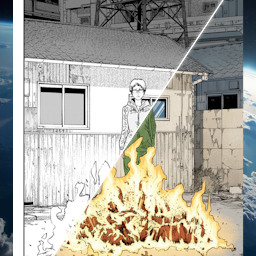
AI-powered manga page colorizer. Takes black-and-white manga image URLs and returns fully colored pages with the original line art preserved. Supports batch processing and multiple original languages for accurate text region handling.
- Total users
- 705
- Monthly active
- 1
- Total runs
- 1.7K
- Bookmarked
- 2
- Rating
- 5.0 (4)
- Last modified
- 2 days ago
This scraper was last updated on .
What does the Manga Colorizer return?

Manga Colorizer
Colorize manga pages with AI, turning black-and-white scans into full-color art. Upload a page URL, pick the original language, and get back a colored image. No GPU, no desktop software, no manual painting.
Coloring a single manga page by hand takes hours of skilled digital painting. Manga Colorizer runs a generative AI model that fills in colors, shading, and tones automatically from a black-and-white image URL. You get a ready-to-use colored page while keeping the original line art intact.
| Who uses it | What they use Manga Colorizer for |
|---|---|
| Scanlation groups | Produce colored releases faster without hiring a dedicated colorist for every chapter. |
| Manga readers | Turn favorite black-and-white panels into colored wallpapers or social posts. |
| Indie comic artists | Preview color treatments on inked pages before committing to a final palette. |
| Content creators | Generate colored manga excerpts for video thumbnails, reviews, or commentary. |
What it does
This Actor takes manga page image URLs and returns each page as a colorized image, with the original line art preserved.
- 🎨 AI colorization: fills flats, gradients, and shading while keeping the original ink lines sharp.
- 🌐 Multi-language OCR support: set the original language so the model reads text regions correctly before coloring.
- 📤 Batch processing: drop in an array of image URLs and colorize a full chapter in one run.
- 🖼️ Standard image formats: accepts JPG, PNG, and WebP inputs.
Results export to CSV, JSON, Excel, or XML, or straight from the API.
What you can do with Manga Colorizer data
🎨 Speed up scanlation releases.
A scanlation team drops raw chapter page URLs, sets Japanese as the original language, and receives colored pages ready for typesetting.
📱 Create social media content.
A manga fan account colorizes iconic panels and posts them as eye-catching images on Instagram or Twitter.
🖌️ Preview color palettes.
An indie comic artist uploads inked pages to see how different color treatments look before starting the final digital paint.
📚 Build a colored archive.
A collector processes a personal library of classic manga pages to enjoy them in color on a tablet or e-reader.
Why choose this scraper
| What you get | |
|---|---|
| No manual painting | AI handles flats, tones, and shading in one pass |
| Line art preserved | The original black ink lines stay untouched |
| Batch ready | Colorize a full chapter by submitting multiple URLs at once |
| Language aware | OCR language setting helps the model understand text regions |
How it compares
No other Store actor targets Manga Colorizer the same way, so the honest comparison is with the alternatives teams actually weigh.
| Manga Colorizer | Build it in-house | By hand | |
|---|---|---|---|
| Setup | Run it now, zero config | Days of engineering | None, but hours per pull |
| When Manga Colorizer changes | Maintained for you | You fix it | You re-learn the page |
| Proxies, retries, anti-bot | Built in | Your problem | Browser only |
| Output | Fixed JSON schema, CSV/Excel export | Whatever you build | Copy-paste |
| Cost | Pay per result | Engineering time | Analyst hours |
Configure the run
Drive the Actor with an array of manga page image URLs and set the original language so the AI model interprets the artwork correctly. The Input tab lists every parameter.
A first run with the defaults:
{
  "imageUrls": [
    "https://api.apify.com/v2/key-value-stores/S8l2sknfAAra9YPZ7/records/Chapter_113_Title_Page.jpg"
  ],
  "originalLanguage": "japanese",
  "targetLanguages": [
    "english",
    "spanish"
  ]
}
Free users
Free-plan runs return up to 10 results as a preview. Upgrade your Apify plan to collect up to 1,000,000 results per run.
Run it
- Create a free Apify account with $5 in credit.
- Open the Manga Colorizer.
- Set your inputs and any filters, then click Start.
- Export the results as CSV, Excel, JSON, or XML from the Dataset tab.
Run it programmatically through the Apify API (run-sync-get-dataset-items) or the ApifyClient for JavaScript and Python.
Use with AI agents (MCP)
Give an AI agent live access to Manga Colorizer through the Model Context Protocol. Add the Actor to Claude, Cursor, or any MCP client:
claude mcp add --transport http apify "https://mcp.apify.com?tools=parseforge/modern-manga-colorizer"
Then prompt it in plain language to run the scraper and read back the results.
Troubleshooting
Why is my image not being colorized?
Check that the image URL is publicly accessible and returns a valid JPG, PNG, or WebP file. URLs that require authentication or redirect to an HTML page will fail.
The colors look washed out or wrong.
The AI model generates colors based on its training data. Results vary by art style. Try a different page with clearer line art and higher contrast for better results.
Processing takes a long time.
Large images or many pages in one run will increase processing time. Reduce the batch size or use smaller image dimensions if speed is critical.
I get an error about unsupported format.
Make sure your URLs point directly to image files ending in .jpg, .png, or .webp. The Actor cannot process PDFs, ZIPs, or embedded images in HTML pages.
The text in the colored image looks garbled.
Set the correct original language in the input. This helps the model identify text regions and avoid painting over them incorrectly.
FAQ
| Question | Answer |
|---|---|
| What image formats does the Actor accept? | It accepts JPG, PNG, and WebP image URLs. Make sure the URLs are publicly accessible so the Actor can download them. |
| Does it work with manhwa or manhua? | Yes. Set the original language to Korean for manhwa or Chinese/Chinese-Traditional for manhua so the OCR model handles text regions correctly. |
| Will the colorization overwrite the original line art? | No. The AI model is designed to add color underneath and around the black ink lines, preserving the original drawing. |
| How many pages can I colorize in one run? | You can submit an array of image URLs. There is no hard page limit in the input, but very large batches will take longer to process. |
| Can I choose the color palette? | The AI model decides colors automatically based on its training. There is no manual palette picker in this Actor. |
| What languages does the OCR support? | It supports Japanese, English, Korean, Russian, Chinese (simplified and traditional), Spanish, French, German, Italian, Portuguese, Thai, Vietnamese, Indonesian, Arabic, and Hindi. |
| Do I need a GPU or special hardware? | No. The Actor runs on Apify's infrastructure. You only need an Apify account and the image URLs. |
| Is the output a single image or a ZIP? | Each input URL produces one colorized image. The dataset contains the individual output image URLs or binary data, depending on the run settings. |
| Can I use this for commercial releases? | You are responsible for the rights to the original manga pages. The Actor provides the colorization tool; it does not grant any copyright or license. |
| What is the Lingo.dev Translation Enhancer option? | That option is for the Manga OCR Translator Actor, not the Manga Colorizer. It does not affect colorization. |
🆘 Need help? Email parseforge@protonmail.com with your run ID, your input, and what you expected.
⚠️ Disclaimer. This Actor is unofficial and is not affiliated with, endorsed by, or sponsored by Manga Colorizer. It collects only publicly available data. You are responsible for using the collected data in compliance with the source's terms of service and applicable data-protection laws, including GDPR, CCPA, and PIPL. Do not use it to collect personal data unlawfully.
What input does the Manga Colorizer accept?
| Field | Type | What it does | Default |
|---|---|---|---|
| imageUrls required | array | Array of manga image URLs to process. Each image will be analyzed to extract text regions. Supported formats: JPG, PNG, WebP. | ["https://api.apify.com/v2/key-value-sto |
| originalLanguage required | string (16 options) | The language of the text in the manga images. This helps OCR accuracy by using the appropriate language model. | japanese |
| targetLanguages required | array | Select one or more target languages for translation. The text will be translated to all selected languages. | ["english","spanish"] |
| enableLingoTranslationEnhancer | boolean | If enabled, uses a two-step translation process: first translates to English using Lingo.dev (raw translation without context), then refines and translates to multiple languages using Gemini AI (with context and Lingo translations). This can improve translation quality by providing a base translation that Gemini can refine. If disabled, only Gemini AI will be used for translation. | false |
How much does the Manga Colorizer cost?
from $60.50 per 1,000 results
| Charged for | What it is | Price each |
|---|---|---|
| Result | Charged once per processed image | $0.0605 to $0.15 |
| Actor Start | Charged when the Actor starts running. Number of events charged depends on Actor memory (one event per GB, minimum one event). | $0.001 to $0.15 |
| Premium Result | Single premium result in dataset. | $0.4 to $0.45 |
Tiered: the lower figure is the price on a higher Apify plan. Billing and the free credit live on Apify.
How do I call the Manga Colorizer API?
One POST returns the dataset directly. Same shape for every scraper in the library, so swapping the slug is the only change.
curl -X POST "https://api.apify.com/v2/acts/parseforge~modern-manga-colorizer/run-sync-get-dataset-items?token=$APIFY_TOKEN" \
  -H "Content-Type: application/json" \
  -d '{
    "imageUrls": [
      "https://api.apify.com/v2/key-value-stores/S8l2sknfAAra9YPZ7/records/Chapter_113_Title_Page.jpg"
    ],
    "originalLanguage": "japanese",
    "targetLanguages": [
      "english",
      "spanish"
    ],
    "enableLingoTranslationEnhancer": false
  }'
What example inputs can I use?
Use these inputs to see how a run is configured.
{
  "imageUrls": [
    "https://api.apify.com/v2/key-value-stores/S8l2sknfAAra9YPZ7/records/Chapter_113_Title_Page.jpg"
  ],
  "originalLanguage": "japanese",
  "targetLanguages": [
    "english",
    "spanish"
  ],
  "enableLingoTranslationEnhancer": false
}
What do users say about the Manga Colorizer?
Rated 5.0 out of 5 across 4 reviews. Read them on Apify.
How do I report an issue with the Manga Colorizer?
We build and maintain this scraper, so a problem with it comes to us. Report it on the Apify listing and the thread stays attached to the scraper where the next person can find it: open an issue.
Broken and urgent, or you would rather not post in public? Write to parseforge@protonmail.com and it reaches the people who wrote it.