 ParseForge
Studio Style Render Generator
parseforge/studio-style-render-generator
AIAutomationDeveloper tools
Upload product photos or portraits and turn them into professional studio-style renders. Pick from preset styles, backgrounds, and lighting setups, or write your own custom descriptions for full creative control.
- Total users
- 16
- Monthly active
- 0
- Total runs
- 374
- Bookmarked
- 2
- Rating
- 5.0 (3)
- Last modified
- 2 days ago
This scraper was last updated on .
What does the Studio Style Render Generator return?

Studio Style Render Generator
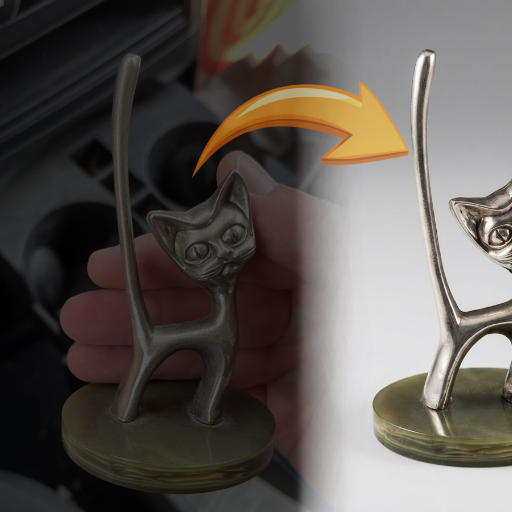
Transform product photos and portraits into professional studio-style renders with AI. Upload up to three images, pick a style, background, and lighting, and get high-resolution renders back. No design skills or expensive software needed.
Getting a polished studio look for product listings or headshots usually means renting a space, hiring a photographer, or wrestling with complex 3D software. This Actor uses generative AI to turn your raw images into clean, commercial-grade renders. You control the subject type, camera angle, lighting setup, and background, and it returns each result as a downloadable image file.
| Who uses it | What they scrape Studio Style Render Generator for |
|---|---|
| E-commerce sellers | Create consistent, white-background product photos for online marketplaces. |
| Marketing teams | Generate editorial-style images for social media campaigns and ads. |
| Independent artists | Render their physical artwork or sculptures in a gallery-like setting for portfolios. |
| Real estate agents | Enhance property photos with better lighting and staging for listings. |
What it does
This Actor takes your uploaded images and generates studio-style renders based on your chosen subject, style, background, and lighting parameters.
- 🎯 Subject-aware optimization: Tell the AI if your image is jewelry, a portrait, food, a car, or one of 28 other types for a tailored render.
- 🎨 Six studio styles: Choose from luxury, classic-photography, editorial, high-contrast, cinematic, or describe your own custom style.
- 💡 Professional lighting presets: Apply softbox, spotlight, window light, clamshell, or dramatic lighting, or define a custom setup.
- 📷 Full camera control: Set the distance from close-up to far and the angle from eye-level to overhead for the perfect composition.
- 🖼️ Background selection: Pick white, black, grey, smooth, textured, or a custom background to match your brand.
Results export to CSV, JSON, Excel, or XML, or straight from the API.
What you can do with Studio Style Render Generator data
🛍️ Standardize product catalogs.
An e-commerce manager uploads a batch of supplier photos, sets the target type to 'product' and background to 'white', and gets back a uniform set of images ready for the store.
📸 Upgrade a portrait portfolio.
A photographer uploads a headshot, selects 'portrait' as the target type and 'clamshell' lighting, and receives a studio-lit version for their website.
🎥 Create cinematic social media assets.
A social media manager uploads a product shot, chooses the 'cinematic' style with 'dramatic' lighting and a 'black' background, and gets a bold image for an ad campaign.
🏠 Enhance real estate listing photos.
An agent uploads a dimly lit interior photo, sets the target to 'real-estate' with 'window' lighting, and receives a bright, inviting image to attract buyers.
Why choose this scraper
| What you get | |
|---|---|
| Batch processing | Upload up to three images in a single run for consistent styling across a set. |
| Custom styles | Write your own style, background, and lighting descriptions when the presets are not enough. |
| Creativity control | Adjust the temperature slider from faithful reproduction to more artistic interpretation. |
| No-code interface | Run everything from Apify Console with simple dropdowns and file uploads, no API calls required. |
How it compares
No other Store actor targets Studio Style Render Generator the same way, so the honest comparison is with the alternatives teams actually weigh.
| Studio Style Render Generator | Build it in-house | By hand | |
|---|---|---|---|
| Setup | Run it now, zero config | Days of engineering | None, but hours per pull |
| When Studio Style Render Generator changes | Maintained for you | You fix it | You re-learn the page |
| Proxies, retries, anti-bot | Built in | Your problem | Browser only |
| Output | Fixed JSON schema, CSV/Excel export | Whatever you build | Copy-paste |
| Cost | Pay per result | Engineering time | Analyst hours |
Configure the run
Drive the Actor by uploading one to three images and selecting your desired subject type, style, background, and lighting. Each parameter refines the AI prompt so the output matches your exact brief. The Input tab lists every parameter.
A first run with the defaults:
{
 "inputImages": [
 "https://api.apify.com/v2/key-value-stores/S8l2sknfAAra9YPZ7/records/cat_jewelry_example.webp"
 ],
 "targetType": "jewelry",
 "style": "custom",
 "customStyle": "Photorealistic 3d render style with raycasting shadows",
 "background": "custom",
 "customBackground": "3D Scene clean white enviroment big empty white box",
 "lighting": "none",
 "cameraDistance": "close",
 "cameraAngle": "eye-level",
 "additionalInstructions": "Premium studio-style renders of this jewelry if more than one angle or item put them next to each other.",
 "temperature": 0.1
}
Free users
Free-plan runs return up to 10 results as a preview. Upgrade your Apify plan to collect up to 1,000,000 results per run.
Run it
- Create a free Apify account with $5 in credit.
- Open the Studio Style Render Generator.
- Set your inputs and any filters, then click Start.
- Export the results as CSV, Excel, JSON, or XML from the Dataset tab.
Run it programmatically through the Apify API (run-sync-get-dataset-items) or the ApifyClient for JavaScript and Python.
Use with AI agents (MCP)
Give an AI agent live access to Studio Style Render Generator through the Model Context Protocol. Add the Actor to Claude, Cursor, or any MCP client:
claude mcp add --transport http apify "https://mcp.apify.com?tools=parseforge/studio-style-render-generator"
Then prompt it in plain language to run the scraper and read back the results.
Troubleshooting
The generated render looks nothing like my original product.
Lower the Creativity Level to 0.1 or 0.2 to force the AI to stay more faithful to the input. Also, make sure the Target Type correctly describes your subject.
My custom style description is being ignored.
Ensure the Style field is set to 'custom'. If it is set to any other preset like 'luxury', the custom description field is not used.
The background in my render is not what I selected.
Double-check that the Background Style is set to your intended option. If you want a custom background, you must select 'custom' and fill in the Custom Background Description field.
The run fails with an error after I upload my images.
Verify your images are not corrupted and are in a supported format like JPEG or PNG. Also, check that you have not exceeded the maximum of three images.
FAQ
| Question | Answer |
|---|---|
| What image formats can I upload? | You can upload images in common web formats like JPEG, PNG, and WebP. The file upload field accepts standard image files. |
| How many images can I process in one run? | You can upload between one and three images per run. Each image will be processed with the same settings you choose. |
| What does the 'Target Type' setting do? | It tells the AI what the main subject of your image is, such as jewelry, a portrait, or food. This helps the model apply the most appropriate rendering techniques for that specific subject. |
| Can I describe my own background instead of using a preset? | Yes. Set the Background Style to 'custom' and then write your description in the Custom Background Description field, like 'a marble surface with soft shadows'. |
| What is the difference between the 'luxury' and 'editorial' styles? | The 'luxury' style aims for a high-end, premium product look with rich tones. The 'editorial' style mimics a fashion magazine aesthetic with more dramatic and stylized compositions. |
| How does the 'Creativity Level' slider work? | It controls the AI's temperature. A low value like 0.1 keeps the render very faithful to your original image. A higher value like 0.9 gives the AI more freedom for artistic interpretation. |
| Will the output image have the same resolution as my input? | The output resolution depends on the AI model's generation size, which is optimized for high-quality renders. It may not match the input pixel dimensions exactly. |
| Can I use this for generating images of people for professional headshots? | Yes. Select 'headshot' or 'portrait' as the Target Type and choose a lighting setup like 'clamshell' for a professional result. |
🆘 Need help? Email parseforge@protonmail.com with your run ID, your input, and what you expected.
⚠️ Disclaimer. This Actor is unofficial and is not affiliated with, endorsed by, or sponsored by Apify. It collects only publicly available data. You are responsible for using the collected data in compliance with the source's terms of service and applicable data-protection laws, including GDPR, CCPA, and PIPL. Do not use it to collect personal data unlawfully.
What input does the Studio Style Render Generator accept?
| Field | Type | What it does | Default |
|---|---|---|---|
| inputImages required | array | Upload 1-3 images to transform into professional studio-style renders. Supports product photos, portraits, or any images you want to enhance. | ["https://api.apify.com/v2/key-value-sto |
| targetType | string (29 options) | Select what type of subject is in your image. This helps the AI optimize the render for your specific use case. | jewelry |
| style | string (7 options) | Choose the studio render style: 'luxury' for high-end premium look, 'classic-photography' for neutral timeless style, 'editorial' for fashion magazine aesthetic, 'high-contrast' for bold dramatic look, 'cinematic' for movie poster style, 'custom' for your own description, or 'none' to let AI decide. | custom |
| customStyle | string | Describe your custom style (only used when Style is set to 'custom'). | Photorealistic 3d render style with rayc |
| background | string (7 options) | Type of studio background: 'white' for clean e-commerce, 'black' for dramatic, 'grey' for neutral, 'seamless' for gradient, 'textured' for premium look, 'custom' for your own description, or 'none' to let AI decide. | custom |
| customBackground | string | Describe your custom background (only used when Background is set to 'custom'). | 3D Scene clean white enviroment big empt |
| lighting | string (7 options) | Professional lighting setup: 'softbox' for even diffused light, 'spotlight' for focused dramatic light, 'window' for natural daylight look, 'clamshell' for beauty/portrait lighting, 'dramatic' for high contrast shadows, 'custom' for your own description, or 'none' to let AI decide. | none |
| customLighting | string | Describe your custom lighting setup (only used when Lighting is set to 'custom'). | not set |
| cameraDistance | string (4 options) | Distance from subject: 'close' for detailed close-up, 'medium' for standard product/portrait shot, 'far' for full-body or environmental context, or 'none' to let AI decide. | close |
| cameraAngle | string (6 options) | Camera perspective: 'eye-level' for natural view, 'high-angle' looking down, 'low-angle' looking up for power/drama, 'side' for profile view, 'overhead' for flat-lay/top-down, or 'none' to let AI decide. | eye-level |
| additionalInstructions | string | Optional: Add any specific instructions or details for your studio render (e.g., 'add subtle reflections', 'emphasize texture', 'warm color tones'). | Premium studio-style renders of this jew |
| temperature | number | Controls how creative the AI is with the render (0.0 to 1.0). Lower values = more faithful to input, higher values = more artistic interpretation. | 0.1 |
How much does the Studio Style Render Generator cost?
from $105.00 per 1,000 results
| Charged for | What it is | Price each |
|---|---|---|
| Actor Start | Charged when the Actor starts running. Number of events charged depends on Actor memory (one event per GB, minimum one event). | $0.001 to $0.002 |
| result | Single result in the default dataset. | $0.105 to $0.21 |
Tiered: the lower figure is the price on a higher Apify plan. Billing and the free credit live on Apify.
How do I call the Studio Style Render Generator API?
One POST returns the dataset directly. Same shape for every scraper in the library, so swapping the slug is the only change.
curl -X POST "https://api.apify.com/v2/acts/parseforge~studio-style-render-generator/run-sync-get-dataset-items?token=$APIFY_TOKEN" \
  -H "Content-Type: application/json" \
  -d '{
    "inputImages": [
      "https://api.apify.com/v2/key-value-stores/S8l2sknfAAra9YPZ7/records/cat_jewelry_example.webp"
    ],
    "targetType": "jewelry",
    "style": "custom",
    "customStyle": "Photorealistic 3d render style with raycasting shadows",
    "background": "custom"
  }'
What example inputs can I use?
Use these inputs to see how a run is configured.
{
  "inputImages": [
    "https://api.apify.com/v2/key-value-stores/S8l2sknfAAra9YPZ7/records/cat_jewelry_example.webp"
  ],
  "targetType": "jewelry",
  "style": "custom",
  "customStyle": "Photorealistic 3d render style with raycasting shadows",
  "background": "custom"
}
What do users say about the Studio Style Render Generator?
Rated 5.0 out of 5 across 3 reviews. Read them on Apify.
How do I report an issue with the Studio Style Render Generator?
We build and maintain this scraper, so a problem with it comes to us. Report it on the Apify listing and the thread stays attached to the scraper where the next person can find it: open an issue.
Broken and urgent, or you would rather not post in public? Write to parseforge@protonmail.com and it reaches the people who wrote it.