 ParseForge
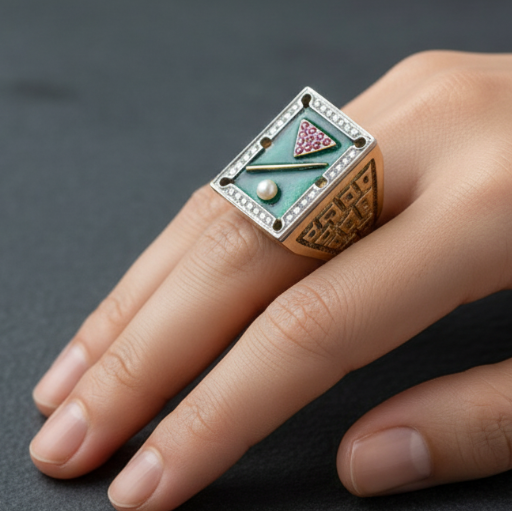
Jewelry Hand Model Image Generator
parseforge/jewelry-hand-model-image-generator
AIE-commerceAutomation
Turns jewelry product photos into professional hand model images. Upload a ring, bracelet, or necklace photo and get a styled image with your choice of hand pose, skin tone, background, lighting, and photography style.
- Total users
- 19
- Monthly active
- 1
- Total runs
- 263
- Bookmarked
- 0
- Rating
- 5.0 (1)
- Last modified
- 2 days ago
This scraper was last updated on .
What does the Jewelry Hand Model Image Generator return?

Jewelry Hand Model Image Generator
Turn plain jewelry photos into professional hand model images. Upload a ring, bracelet, or necklace shot and get back a studio-grade photo of it worn on a hand, with the pose, skin tone, background, and lighting you choose. No photography studio, no model, no Photoshop.
Jewelry product photos without a hand model look flat and fail to show scale. Hiring a model and a photographer costs hundreds per shot, and editing a hand into an existing photo in Photoshop takes hours and still looks fake. This Actor generates a realistic hand model image from your jewelry photo in about a minute, with full control over the hand pose, skin tone, background, lighting, camera angle, and overall photography style.
| Who uses it | What they scrape Jewelry Hand Model Image Generator for |
|---|---|
| Etsy and Shopify jewelry sellers | Create consistent, on-model product photos for every listing without a photo shoot |
| Jewelry brands and e-commerce managers | Produce campaign-style visuals for social media and ads in minutes |
| Dropshippers and print-on-demand sellers | Generate hand model images for supplier photos that only show the product on white |
| Marketing agencies serving jewelry clients | Deliver multiple styled hand model variations for A/B testing creative |
| Independent jewelry designers | Showcase new pieces on a hand model before investing in a full photo shoot |
What it does
This Actor takes 1 to 3 jewelry images and returns a generated image of that jewelry worn on a hand model, styled to your exact specifications.
- 🖐️ Hand pose control: relaxed, open-palm, displaying, elegant, artistic, or write your own custom pose.
- 🎨 Skin tone options: fair, light, medium, tan, brown, dark, ebony, or describe a custom tone.
- 📸 Photography styles: editorial, luxury, minimalist, cinematic, high-fashion, product, or custom.
- 💡 Lighting setups: soft-natural, dramatic, moody, bright, side-light, backlight, or custom.
- 📐 Camera angles: straight-on, side, angled, overhead, low-angle, or custom.
- 🖼️ Background choices: white, black, grey, concrete, marble, wood, fabric, textured, or custom.
- 🎚️ Creativity slider: set temperature from 0.0 to 1.0 to control how closely the output follows your input.
Results export to CSV, JSON, Excel, or XML, or straight from the API.
What you can do with Jewelry Hand Model Image Generator data
🛍️ E-commerce product photos.
An Etsy seller uploads a supplier photo of a ring and generates a hand model image with a relaxed pose, medium skin tone, and white background to match their existing listings.
📣 Social media ad creatives.
A jewelry brand generates high-fashion hand model images with dramatic lighting and a marble background for a Facebook ad campaign, testing three different poses in one run.
🎨 Design mockups for clients.
A freelance designer uses the Actor to show a client how a new bracelet design looks on a hand with an editorial style and concrete background before the piece is even manufactured.
📦 Dropshipping store setup.
A dropshipper takes generic supplier photos of necklaces and generates consistent hand model images with a minimalist style and grey background for a new Shopify store.
🧪 A/B testing product imagery.
A marketing team generates the same ring on a hand with two different skin tones and backgrounds to test which image drives more clicks on a product page.
Why choose this scraper
| What you get | |
|---|---|
| No model or studio needed | Generate a hand model image from any jewelry photo in about a minute |
| Full creative control | Choose pose, skin tone, background, lighting, angle, and style, or write your own |
| Consistent brand look | Use the same settings across all products for a uniform catalog |
| Cost-effective | Pay per image, not per hour of a photographer and model |
How it compares
No other Store actor targets Jewelry Hand Model Image Generator the same way, so the honest comparison is with the alternatives teams actually weigh.
| Jewelry Hand Model Image Generator | Build it in-house | By hand | |
|---|---|---|---|
| Setup | Run it now, zero config | Days of engineering | None, but hours per pull |
| When Jewelry Hand Model Image Generator changes | Maintained for you | You fix it | You re-learn the page |
| Proxies, retries, anti-bot | Built in | Your problem | Browser only |
| Output | Fixed JSON schema, CSV/Excel export | Whatever you build | Copy-paste |
| Cost | Pay per result | Engineering time | Analyst hours |
Configure the run
Drive the Actor with 1 to 3 jewelry images, then set the jewelry type, hand pose, skin tone, background, lighting, camera angle, and photography style. Every setting has a custom option so you can describe exactly what you want in plain text. The Input tab lists every parameter.
A first run with the defaults:
{
  "inputImages": [
    "https://api.apify.com/v2/key-value-stores/S8l2sknfAAra9YPZ7/records/Vintage-Billiard-Table-Enamel-Diamond-Ruby-Pearl-Ring-JRD001-86579a1.800.jpg"
  ],
  "jewelryType": "ring",
  "handPose": "relaxed",
  "skinTone": "none",
  "background": "custom",
  "customBackground": "blurred textured concrete or dark slate surface, minimalist architectural atmosphere",
  "lighting": "soft-natural",
  "cameraAngle": "angled",
  "imageStyle": "high-fashion",
  "additionalInstructions": "Ultra-sharp focus on the jewelry details, 8k resolution, luxury jewelry campaign aesthetic.",
  "temperature": 0.1
}
Free users
Free-plan runs return up to 10 results as a preview. Upgrade your Apify plan to collect up to 1,000,000 results per run.
Run it
- Create a free Apify account with $5 in credit.
- Open the Jewelry Hand Model Image Generator.
- Set your inputs and any filters, then click Start.
- Export the results as CSV, Excel, JSON, or XML from the Dataset tab.
Run it programmatically through the Apify API (run-sync-get-dataset-items) or the ApifyClient for JavaScript and Python.
Use with AI agents (MCP)
Give an AI agent live access to Jewelry Hand Model Image Generator through the Model Context Protocol. Add the Actor to Claude, Cursor, or any MCP client:
claude mcp add --transport http apify "https://mcp.apify.com?tools=parseforge/jewelry-hand-model-image-generator"
Then prompt it in plain language to run the scraper and read back the results.
Troubleshooting
Why does the generated hand look distorted or have extra fingers?
AI image generation can sometimes produce imperfect hands. Try lowering the creativity level to 0.0 or 0.1, use a simpler hand pose like 'relaxed', and make sure your input image clearly shows the jewelry without obstructions.
Why is the jewelry not recognizable in the output?
The input image may be too low resolution or the jewelry too small in the frame. Upload a clear, close-up photo of the jewelry on a plain background, and set the creativity level lower so the AI stays closer to the original.
Why am I getting an error when I upload my images?
Make sure your images are in JPG, PNG, or WebP format and under the file size limit. Also check that you have uploaded at least one image and no more than three.
Why does the output ignore my custom hand pose description?
The custom hand pose is only used when the Hand Pose setting is set to 'custom'. If you selected a preset pose, your custom description is ignored. Change the Hand Pose to 'custom' and re-run.
Why does the run take longer than expected?
Generation time depends on the number of images, the complexity of your settings, and the current queue. If you are generating 3 images with many custom settings, it may take a few minutes. Try reducing the number of images or using preset options.
FAQ
| Question | Answer |
|---|---|
| What kind of jewelry images can I upload? | You can upload 1 to 3 images of rings, bracelets, watches, necklaces, earrings, brooches, pendants, bangles, anklets, chains, or any custom jewelry type. The images should clearly show the jewelry, ideally on a plain background. |
| How long does it take to generate an image? | A typical run takes about 1 to 2 minutes per image, depending on the complexity of your settings and the current queue. |
| Can I use the generated images commercially? | Yes, the images you generate are yours to use for commercial purposes, including product listings, ads, and social media. |
| What if I don't like the result? | You can adjust any setting, such as the hand pose, lighting, or creativity level, and run the Actor again. The temperature slider is useful for getting results closer to your input photo. |
| Do I need to describe the hand pose in detail? | No, you can pick from preset poses like relaxed, open-palm, or displaying. If you want something specific, choose 'custom' and describe it in your own words. |
| Can I generate images with a specific skin tone? | Yes, you can choose from fair, light, medium, tan, brown, dark, or ebony. You can also select 'custom' and describe any skin tone you want. |
| What image formats are supported for upload? | The Actor accepts common image formats such as JPG, PNG, and WebP. The output is a high-resolution JPG image. |
| Can I generate multiple images in one run? | Yes, you can upload up to 3 jewelry images in a single run, and the Actor will generate a hand model image for each one using the same settings. |
| Is there a way to make the output look more like my original photo? | Set the creativity level (temperature) to a lower value, such as 0.0 or 0.1. This makes the AI follow your input image more closely. |
| What does the 'custom' option do for settings like background or lighting? | When you select 'custom' for any setting, a text field appears where you can describe exactly what you want. For example, you could write 'blurred concrete with warm morning light' for a custom background. |
🆘 Need help? Email parseforge@protonmail.com with your run ID, your input, and what you expected.
⚠️ Disclaimer. This Actor is unofficial and is not affiliated with, endorsed by, or sponsored by Jewelry Hand Model Image Generator. It collects only publicly available data. You are responsible for using the collected data in compliance with the source's terms of service and applicable data-protection laws, including GDPR, CCPA, and PIPL. Do not use it to collect personal data unlawfully.
What input does the Jewelry Hand Model Image Generator accept?
| Field | Type | What it does | Default |
|---|---|---|---|
| inputImages required | array | Upload 1-3 jewelry images to transform into professional hand model photography. Works with rings, bracelets, necklaces, and more. | ["https://api.apify.com/v2/key-value-sto |
| jewelryType | string (11 options) | Type of jewelry to showcase: ring, bracelet, watch, necklace, earrings, or other jewelry pieces. | ring |
| handPose | string (11 options) | Hand positioning style: 'relaxed' for natural elegant pose, 'open-palm' for showing full hand, 'displaying' for presenting jewelry, 'elegant' for graceful positioning, 'artistic' for dramatic pose, 'custom' for your own description, or 'none' to let AI decide. | relaxed |
| customHandPose | string | Describe your custom hand pose (only used when Hand Pose is set to 'custom'). | not set |
| skinTone | string (9 options) | Hand model skin tone: choose from fair, light, medium, tan, brown, dark, ebony, 'custom' for your own description, or 'none' to let AI decide. | none |
| customSkinTone | string | Describe your custom skin tone (only used when Skin Tone is set to 'custom'). | not set |
| background | string (10 options) | Background type: 'white' for clean, 'black' for dramatic, 'concrete' for textured modern, 'marble' for luxury, 'wood' for natural, 'fabric' for soft, 'textured' for artistic, 'custom' for your own description, or 'none' to let AI decide. | custom |
| customBackground | string | Describe your custom background (only used when Background is set to 'custom'). | blurred textured concrete or dark slate |
| lighting | string (8 options) | Lighting setup: 'soft-natural' for gentle lighting, 'dramatic' for high contrast, 'moody' for atmospheric, 'bright' for even illumination, 'side-light' for depth, 'backlight' for rim lighting, 'custom' for your own description, or 'none' to let AI decide. | soft-natural |
| customLighting | string | Describe your custom lighting setup (only used when Lighting is set to 'custom'). | not set |
| cameraAngle | string (7 options) | Camera perspective: 'straight-on' for direct view, 'side' for profile, 'angled' for 45-degree perspective, 'overhead' for top-down, 'low-angle' for upward view, 'custom' for your own description, or 'none' to let AI decide. | angled |
| customCameraAngle | string | Describe your custom camera angle (only used when Camera Angle is set to 'custom'). | not set |
| imageStyle | string (8 options) | Overall photography aesthetic: 'editorial' for magazine style, 'luxury' for high-end campaign, 'minimalist' for clean aesthetic, 'cinematic' for film-inspired, 'high-fashion' for runway aesthetic, 'product' for commercial photography, 'custom' for your own description, or 'none' to let AI decide. | high-fashion |
| customImageStyle | string | Describe your custom image style (only used when Photography Style is set to 'custom'). | not set |
| additionalInstructions | string | Optional: Add any specific instructions or details for your jewelry hand model image (e.g., 'focus on ring details', 'warm color tones', 'show articulation'). | Ultra-sharp focus on the jewelry details |
| temperature | number | Controls AI creativity (0.0-1.0). Lower values = more faithful to input, higher values = more artistic interpretation. | 0.1 |
How much does the Jewelry Hand Model Image Generator cost?
from $100.00 per 1,000 results
| Charged for | What it is | Price each |
|---|---|---|
| Actor Start | Charged when the Actor starts running. Number of events charged depends on Actor memory (one event per GB, minimum one event). | $0.01 to $0.05 |
| result | Single result in the default dataset. | $0.1 to $0.14 |
Tiered: the lower figure is the price on a higher Apify plan. Billing and the free credit live on Apify.
How do I call the Jewelry Hand Model Image Generator API?
One POST returns the dataset directly. Same shape for every scraper in the library, so swapping the slug is the only change.
curl -X POST "https://api.apify.com/v2/acts/parseforge~jewelry-hand-model-image-generator/run-sync-get-dataset-items?token=$APIFY_TOKEN" \
  -H "Content-Type: application/json" \
  -d '{
    "inputImages": [
      "https://api.apify.com/v2/key-value-stores/S8l2sknfAAra9YPZ7/records/Vintage-Billiard-Table-Enamel-Diamond-Ruby-Pearl-Ring-JRD001-86579a1.800.jpg"
    ],
    "jewelryType": "ring",
    "handPose": "relaxed",
    "skinTone": "none",
    "background": "custom"
  }'
What example inputs can I use?
Use these inputs to see how a run is configured.
{
  "inputImages": [
    "https://api.apify.com/v2/key-value-stores/S8l2sknfAAra9YPZ7/records/Vintage-Billiard-Table-Enamel-Diamond-Ruby-Pearl-Ring-JRD001-86579a1.800.jpg"
  ],
  "jewelryType": "ring",
  "handPose": "relaxed",
  "skinTone": "none",
  "background": "custom"
}
What do users say about the Jewelry Hand Model Image Generator?
Rated 5.0 out of 5 across 1 review. Read them on Apify.
How do I report an issue with the Jewelry Hand Model Image Generator?
We build and maintain this scraper, so a problem with it comes to us. Report it on the Apify listing and the thread stays attached to the scraper where the next person can find it: open an issue.
Broken and urgent, or you would rather not post in public? Write to parseforge@protonmail.com and it reaches the people who wrote it.
What related scrapers can I use?
Run Jewelry Hand Model Image Generator on Apify All scrapers